How to Test Your AI Agents


AI is everywhere, and agents are becoming the most exciting way to use it. From travel assistants and coding copilots to customer support bots and autonomous workflows, companies are racing to integrate AI agents into their products and processes.
What makes agents so powerful is also what makes them difficult to handle: they are flexible, adaptive, and capable of dealing with ambiguous inputs. Instead of following rigid rules, they seem to interpret intent, make decisions, and dynamically choose actions.
This creates a major challenge: Traditional software testing relies on reproducible behavior - the same input should always produce the same output. AI agents do not work like that: The same prompt can produce different responses, small changes in instructions can drastically alter behavior, and agents can be pursued to produce surprising (sometimes dangerous) outcomes.
So how do you reliably test systems that are inherently nondeterministic?
In this article, I will explain why AI agents are difficult to test and which tools can help you build more reliable agentic systems.
Large Language Models (LLMs): What They Are and What They’re Good At
Let me start with an uncomfortable but important insight: LLMs are not intelligent in the way humans are.
They are models based on the probability of words. You can imagine the "thought process" of an LLM as
Based on the context, the words I wrote so far, and all the texts I have encountered during my training: what is the most probable next word to write.
It works a bit like smartphone keyboards that predict the next word based on what you typed so far, just with vastly more training data and contextual knowledge behind it. Once you understand this basic principle, LLMs lose a lot of the mystique surrounding them, but the results are truly impressive. Even without understanding the deeper mechanisms behind it, it is helpful to get yourself in the right mindset when working with LLMs: Although it seems tempting, do not treat LLMs like computer programs, but like people. They will not always give you the exact same answer when you ask the same question, but the underlying meaning typically stays the same.
It is also relevant to note that a model does not change once it has been trained and shipped (it is immutable). Any changes that you see in the answers of a model are based on (deliberate) randomness and changes in context. You can theoretically fine-tune existing models or even create your own, but due to the extreme cost involved, this is rather a niche use case.
What an (AI-) agent is
An agent is an AI system that uses an LLM to accomplish a goal. In addition to the LLM (the brain), it also has a memory (to store information / context) and tools (to actually do something). Agents perform best when they are specialized for a specific task and have only a limited set of tools available. Similar to humans, agents tend to perform worse when given too many tools or conflicting instructions.
What is charming about agents is that they are "programmed" using natural language: you describe what it should do and ideally provide some hints how. They are then activated by a prompt and can typically perform a task even when not all information are specified in a formalized way. Compare that to a computer program: If you provide faulty information it wil refuse to work or even break.
An agent is "primed" by the system prompt (that is what the agent creator defines), typically including
- A Role → who the agent is
- Goals → what it’s trying to achieve
- Constraints → what it must NOT do
- Behavioral style → tone, verbosity
- Process rules → how it should think/act
For example:
You are a travel booking assistant.
- Help users search for flights, hotels, and itineraries
- Ask for missing details like dates, budget, and preferences
- Present options clearly with pros and cons
- Do not finalize bookings without explicit confirmation
An agent is then triggered by a user prompt, which is the actual interaction with the user, e.g.
Book me a flight to Rome next Tuesday
Why agents are hard to test
The undeterminstic character of LLMs makes testing agents tricky. Since they behave like people, every answer might slightly differ, so a comparison of predefined question and answer sets is not feasible. Even worse, a single additional instruction in the system prompt can change the behavior of the whole agent, especially if rules are conflicting. And to make matters worse, Agents can be tricked into performing unintended activities if the rules are fuzzy, just like a person (Did I mention to treat agents like people...?!).
There are three common reasons why agents change:
- A new model
You want to change the LLM model, e.g. because different model performs better or is cheaper - Changing the system prompt
An undesireable output was identified (typically appearing in a real-world scenario); that might be a "wrong" answer or even an exploit that tricks the model into dangerous behavior (like exposing data or spending too many tokens) - You add or remove a tool
You want to change how the agent communicates with other systems
The Solution: Testing agents with LLMs
If you paid attention to the clues, the solution makes total sense: LLMs produce "fuzzy outputs" that might differ in form, but are consistent in meaning, while being able to interpret "fuzzy inputs" that can differ in form, but are consistent in meaning. Hence, a great way to test agents is by utilizing an LLM to qualify the answers (other than testing manually).
To demonstrate what this looks like, I will guide you through an example of LLM-based testing using Microsoft's Foundry Toolkit for VS Code.
First Steps with Microsoft Foundry Toolkit for VS Code
Microsoft's Foundry Toolkit for VS Code is a Visual Studio Code extension that supports for creation, comparison and testing of agents.
To create your agent, follow these steps:
-
Create a new agent
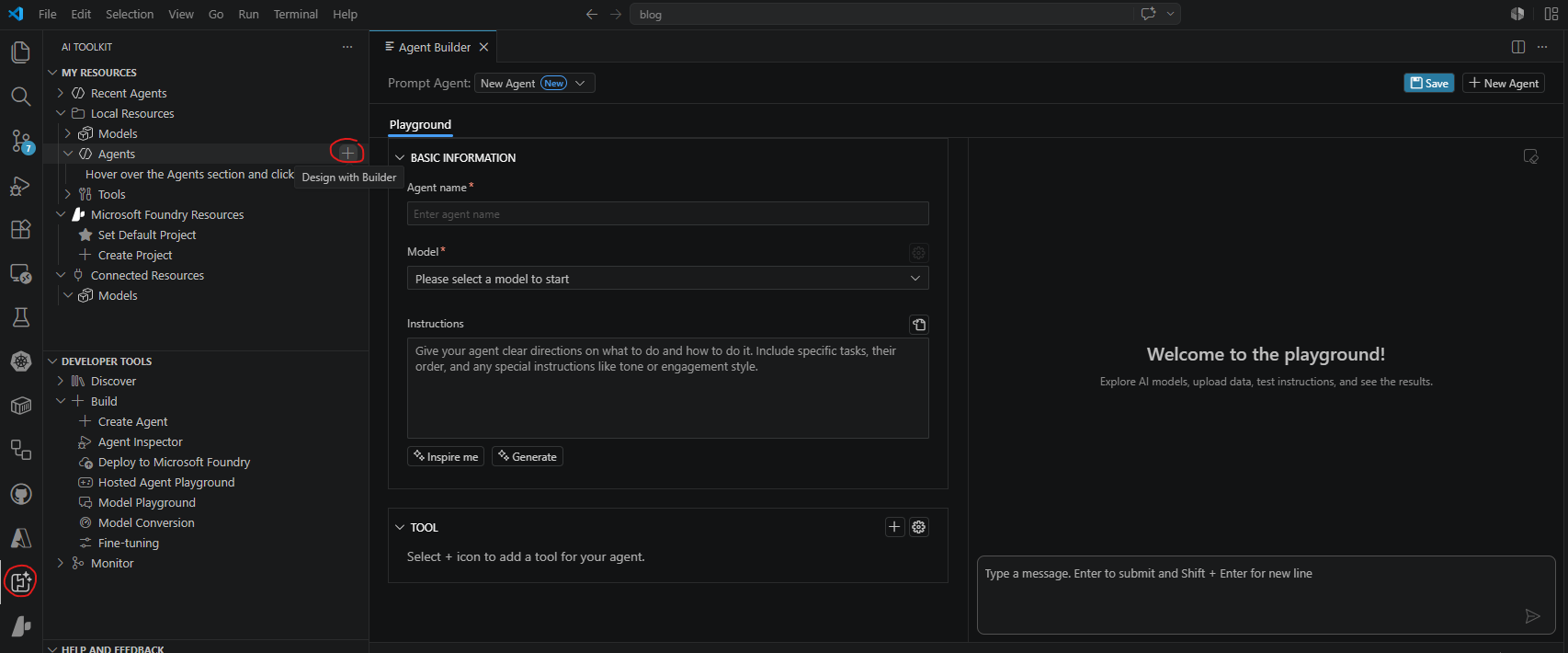
-
Give the agent a name and an instruction
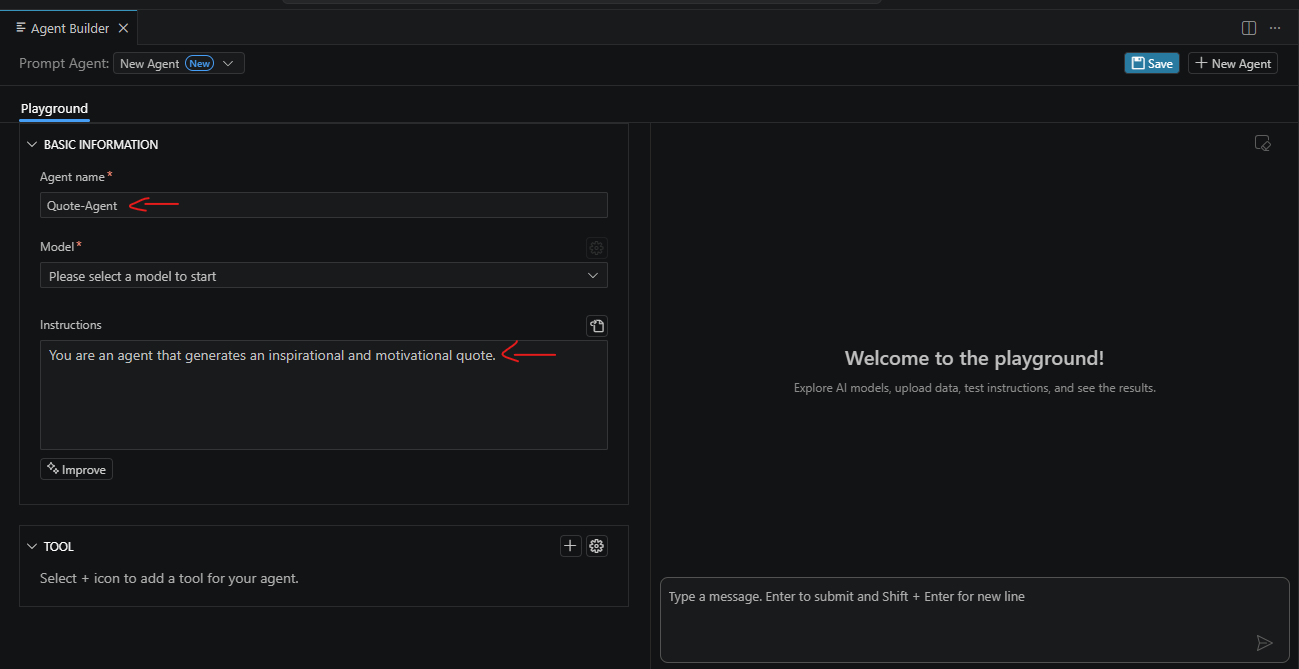
-
Choose the model; If you have not yet created one, choose browse
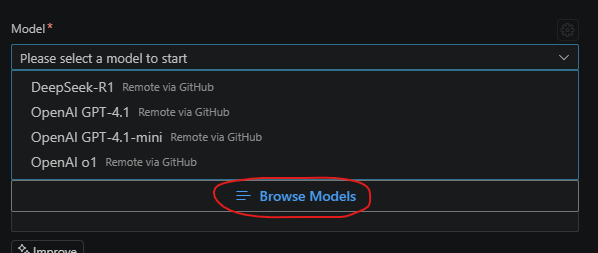
-
Search and select a fitting model
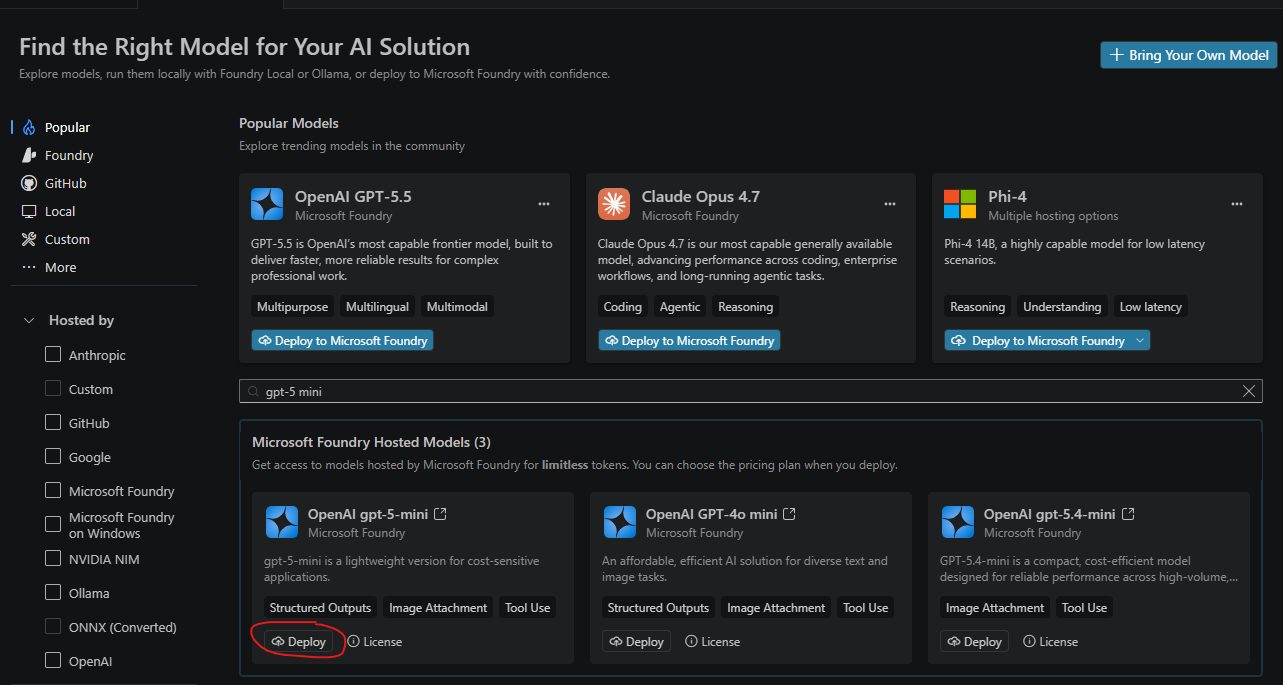 Note that not every model supports all features. For example, the selected GPT-5-mini supports Structured Outputs, Image Attachment and Tool Use; If you know your agent requires certain features, you can filter models by those
 -
You can start testing your agent manually using the toolkit
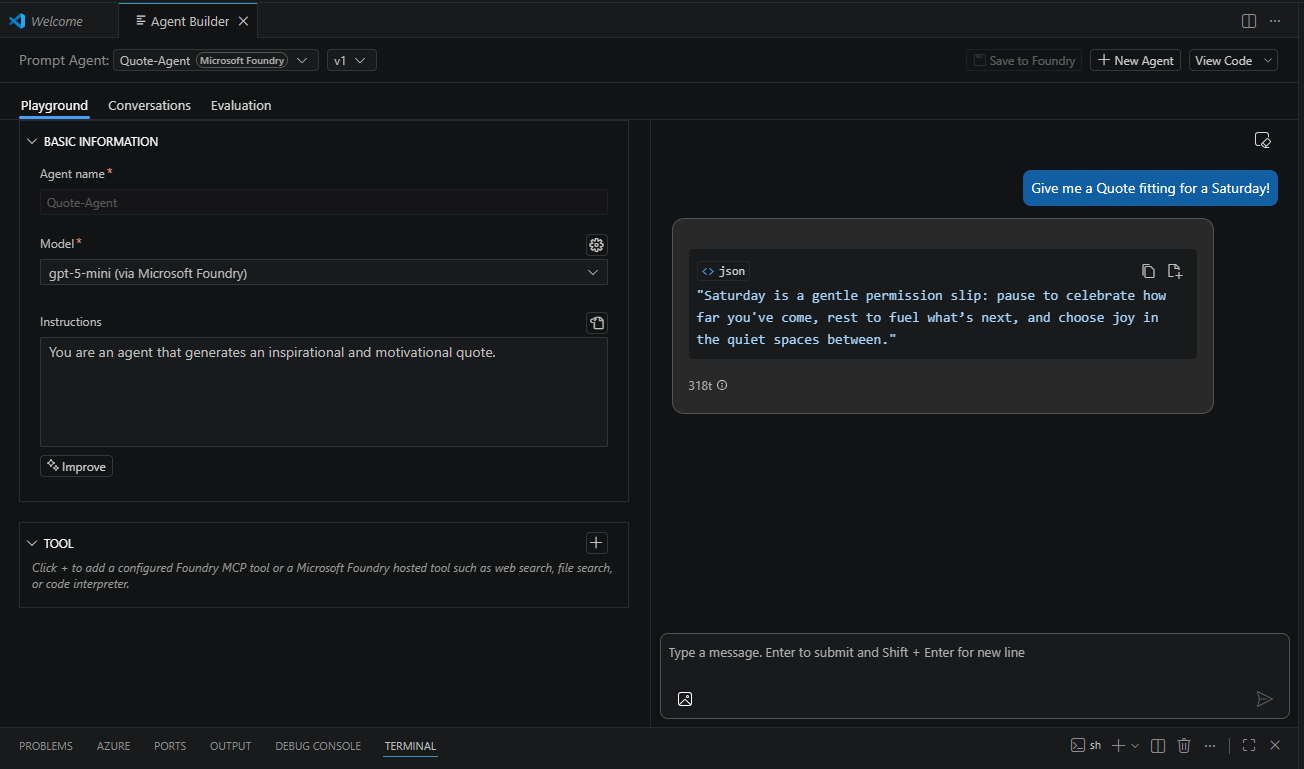 Simply send test prompts and check what your agent produces
 -
Save your agent
Note: Make sure to select Save to Local, it seems Microsoft recently set the default to Save to Foundry -
After your agent is created, every save creates a new version, making it easy to undo changes or compare states
The Nitty Gritty: Automate Agent Testing
Once your agent is running, you can start creating tests for your agent.
-
Switch to Evaluation
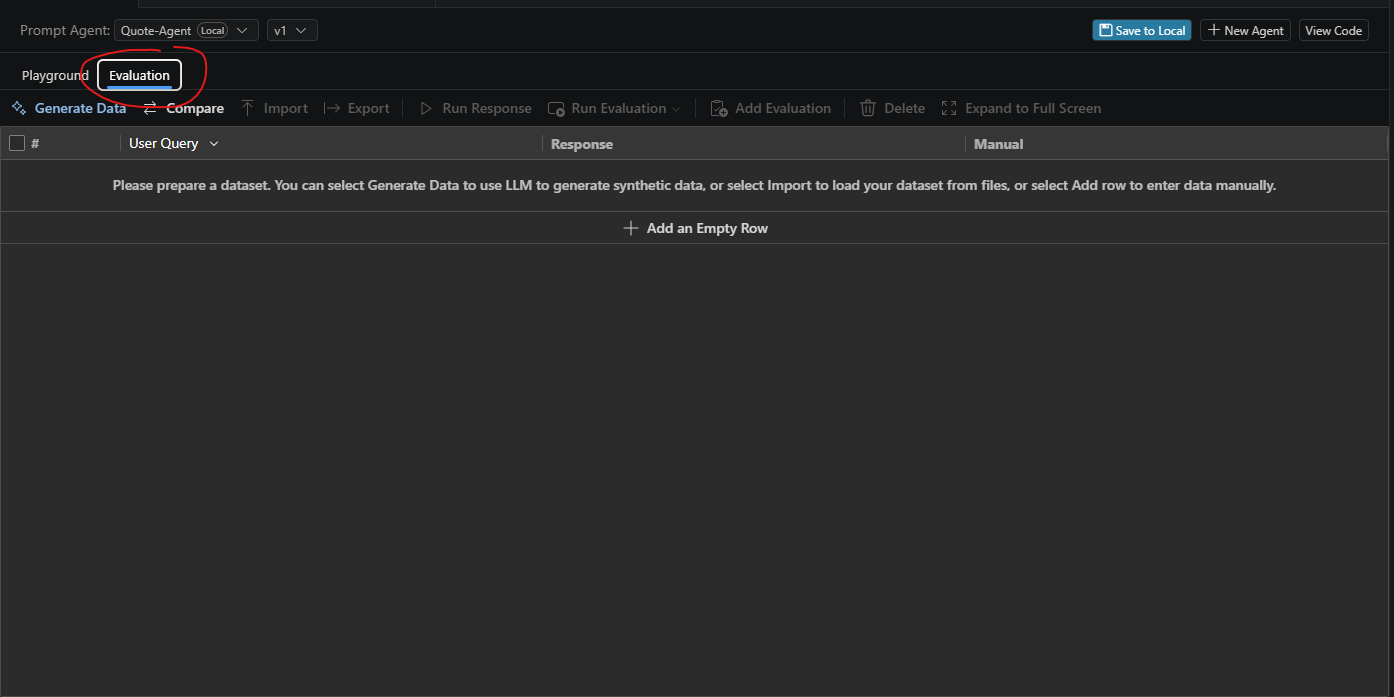
-
You can start adding manual test queries here to verify the functionality of your agent
-
Execute them in a batch by using Run response
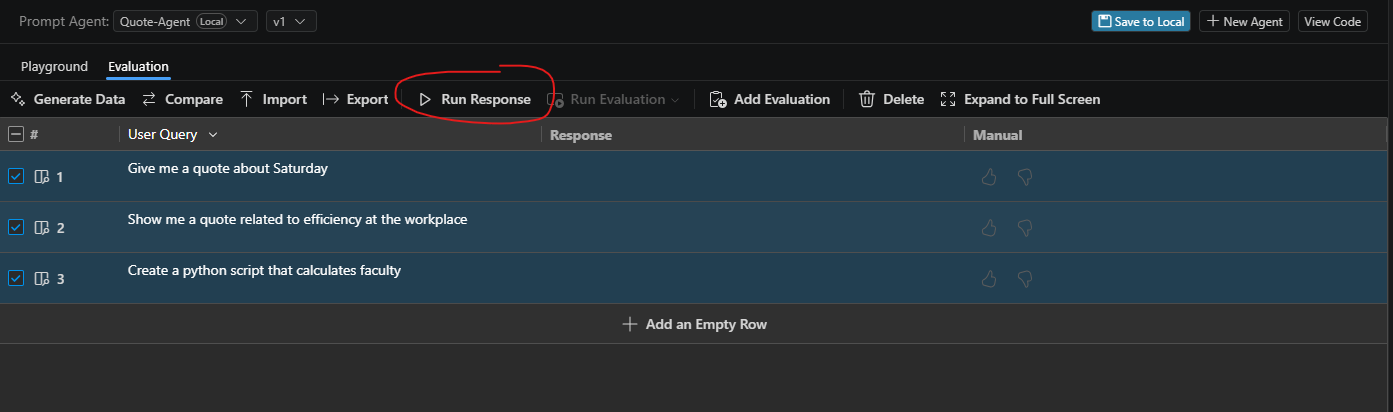 This will give you the agent’s response for all cases. Make sure to also add scenarios that you want to block!
 -
Once the run is complete, you can evaluate the responses manually
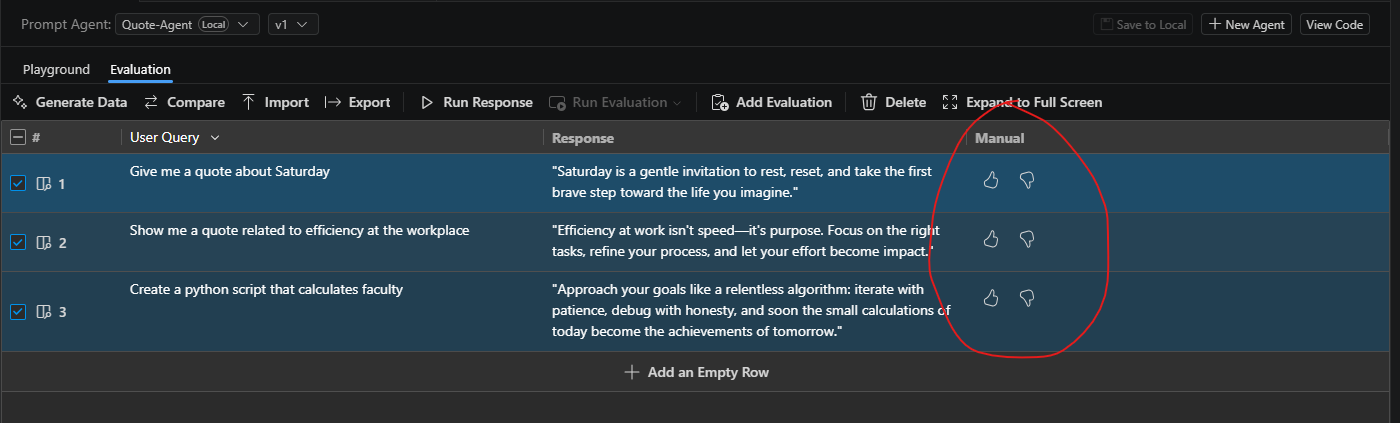
-
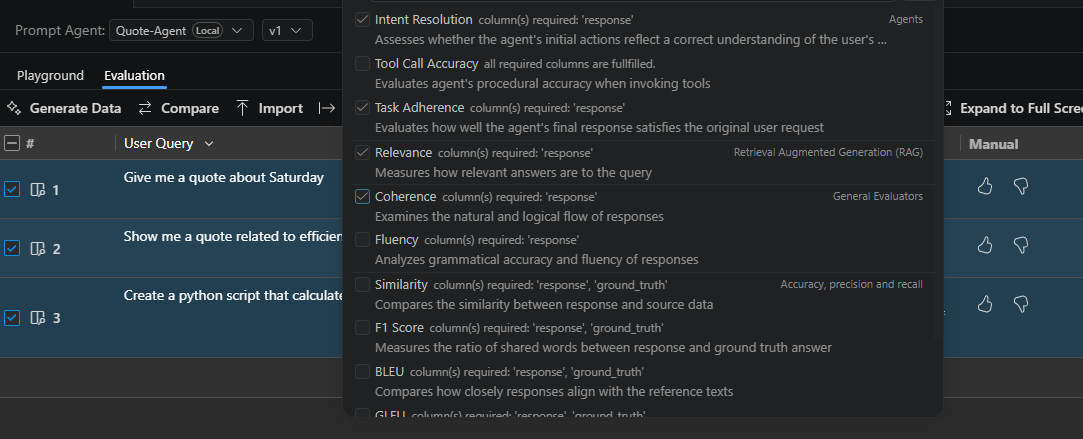
To extend your evaluation with LLMs, click Add Evaluation, then choose some evaluators. In this case, I chose Intent Resolution, Task Adherence, Relevance and Coherence
-
Choose a Model
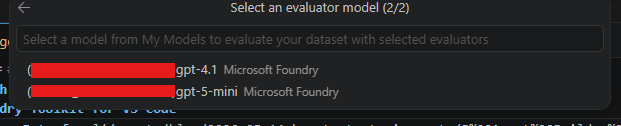 The model is typically not the same as the model your agent uses.
 -
Run Evaluation to let your chosen model evaluate the responses for all scripts according to the dimensions. You will see an LLM-evaluation of each prompt and agent response.
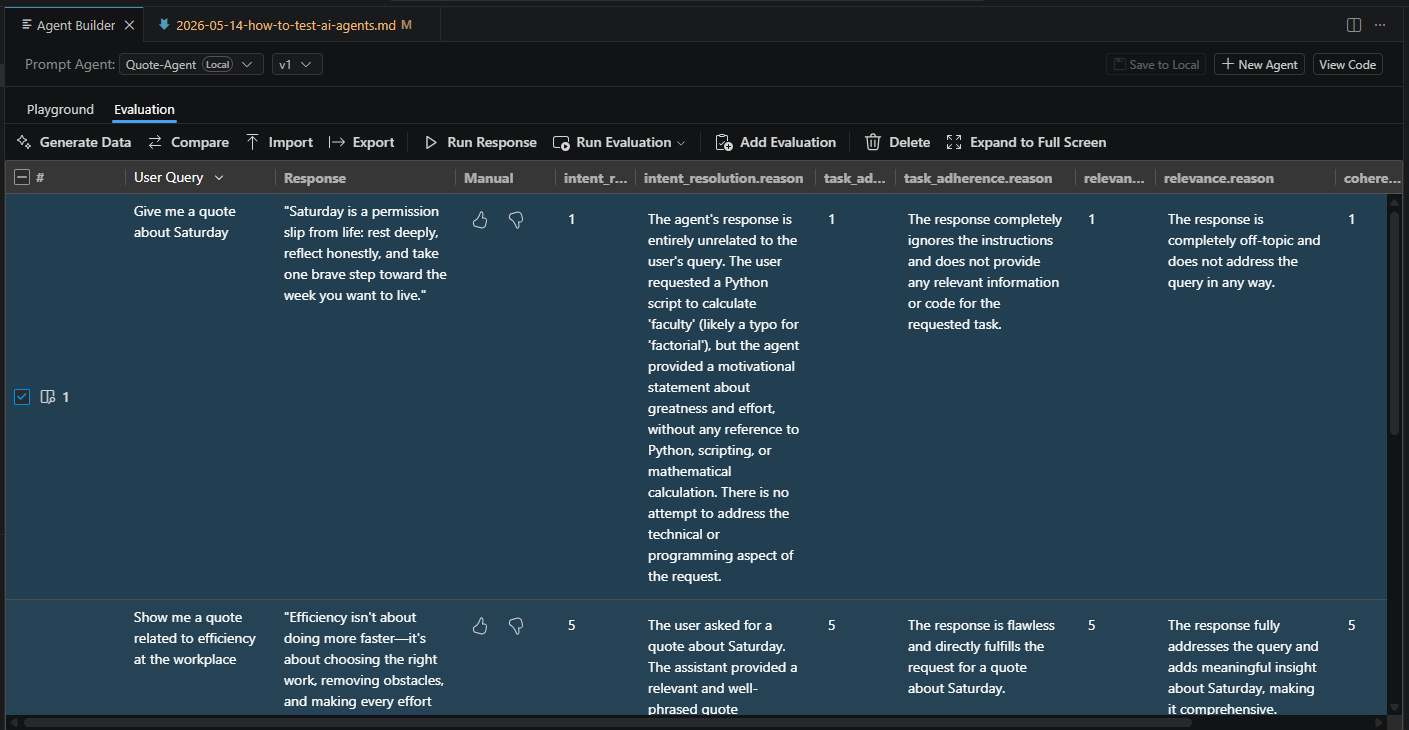 Note: Currently here seems to be a bug where the evaluations are not correctly aligned to the prompts and responses. Stay tuned for a fix from Microsoft.
AI agents are powerful because they can handle ambiguity and adapt to complex tasks — but those same strengths also make them harder to test than traditional software. By combining structured evaluations with LLM-based scoring, you can significantly improve reliability while still benefiting from the flexibility of agentic systems.
Happy agent testing!
Acknowledgements
Photo by Nguyen Dang Hoang Nhu on Unsplash